|
Alert! Chipset heat sink not detected, system halted! (5/25/08) With four websites and two portfolios begging me to work on them, right now, and the monthly update for Desert Exposure just days away . . . This. Was. Unacceptable. I rebooted my machine (a Dell 4600C) to finish an XP update cycle and that's the message it gave me. 2 seconds into its boot cycle, it just stopped. Again. Then again. And again. It really meant it. I took out my soldering iron and went to work. Back up a minute. First I went and poured a cup of coffee and stared at my mutinous hardware. Then I got on the net using a notebook and searched for the error message. This problem seems endemic to Dell 4600C's. A dreadful number of threads end with new machines or at least new motherboards after frustrating adventures with tech support and multiple forays to local computer shops. [There are many more happy endings now than then. Still... read on. dc] It's not a tough problem! The proximal cause of the message is the failure of a spring holding the chipset heatsink (not the CPU heatsink) in place. The spring is mechanically important (it keeps the heatsink in place and in firm contact with some hot and critical chip on the momboard) as well as electrically significant (it connects contact points "HS1" with "HS2"). The spring hooks into "stirrups" which plug into HS1 and HS2. Break the electrical connection, you get the message. Usually, one of the stirrups turns loose. The question is: does the failure of the connection betoken overheating, or it just a mechanical failure? I bet on the latter, but did what I could for both issues, just in case. I have an older 4600C sitting here handy for comparitive anatomy (lightning destroyed something important in it and I bought the one I currently use on eBay for about $200). I opened up both cases, and sure enough: the spring was sprung in my current machine. It was missing the stirrup which anchors it at HS1. The older machine showed me how it was supposed to look. So many threads devoted to this problem end in sorrow or significant expense, but my tale does not, so I've documented the fix for the next stunned schmuck who gets that message and searches for it on the 'net, because the fix is easy and fast (had mine going in 2 hours, including time to go buy Arctic Siver heat transfer grease at the nearest Radio Shack, 17 miles away -- they didn't carry the heat transfer epoxy I really wanted). Looky:
You need to provide both functions of that spring to fix the problem. You have to reconnect HS1 and HS2 electrically, and you have to make sure the heatsink is held firmly to the momboard. If it comes loose, the chipset will fry a few seconds after you turn the machine on (so I read). To complete the circuit from HS1 to HS2, telephone wire and a solder gun will do (and thank you Dr. David Close of the ETSU physics department for teaching me how to solder wire to a circuit board: insert wire, heat wire, touch hot wire with a well-tinned soldering tip and a second or so later with a thin strand of solder; liquid metal flows down the wire and into the hole pretty as you please; do this gently, quickly, and as deftly as possible; if you pretend to know what you are doing, you are more likely to get away with it). In the absence of the spring, the heatsink came off easily enough.
I used Arctic Silver thermal cleaner to clean up both the heatsink and the polished face on the exposed chip. You can use alcohol if you don't have the cleaner. And use thermal grease and a jury-rigged hold-down if you don't have the epoxy. (I know because I actually did this fix twice -- once in a hurry using vodka as a cleaner, thermal grease to insure thermal contact, and a tennis-ball-sized wad of aluminum foil compressed between the computer case and the heatsink to keep the heatsink in place while I finished up jobs under deadline. At the same time, I ordered the exact stuff needed: Arctic Silver thermal cleaner and Arctic Silver Alumina epoxy. When it arrived via overnight express, I re-did the fix for real at leisure.)
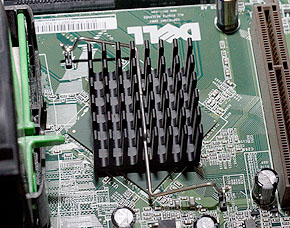
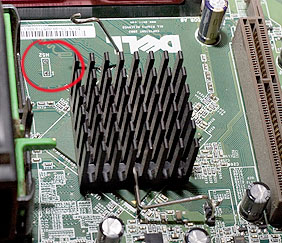
The red line indicates the electrical connection needed. The chip is shown still cruddy with old thermal grease -- i.e., as yet uncleaned. I don't have any photos showing it in its gleaming state after cleaning.
Voila! Chipset heatsink epoxied in place (negating the mechanical need for the unused but still present spring) and telephone wire soldered in to provide the electrical connection between the two circuit points. Note that I rotated the heatsink to correspond to the silk-screened indicator on the motherboard since the no-longer-used spring no longer needs to reach the stirrups. One week on: so far, so good.
Twelve months down: the computer is a tower again, no problems. Fifteen months: flat again because new desk arrangement doesn't offer enough room to stand it up, all is well. Twenty-seven months: still working like a champ.
:: back to the slow blog ::
|


© 2010, David Cortner